Adding terminfo Entries to a Remote Machine
Transferring Files Between Android and GNU/Linux, and the terminfo Problem with foot Terminal
I use the foot terminal emulator on my system, which runs correctly on wayland and is very simple, fast, and minimal. For transferring files between my Android phone and my GNU/Linux system, I use scp or rsync over ssh. If you’re interested, you can watch the tutorial video I made about this.
When I first SSH’d from the foot terminal into my Android phone, the terminal colors were not displayed correctly and every character I typed appeared twice. After a bit of searching, I found that the problem was related to missing terminfo data on termux. Here you can see the missing colors and the repeated zsh prompt data on Termux after SSH, and compare it with the phone:
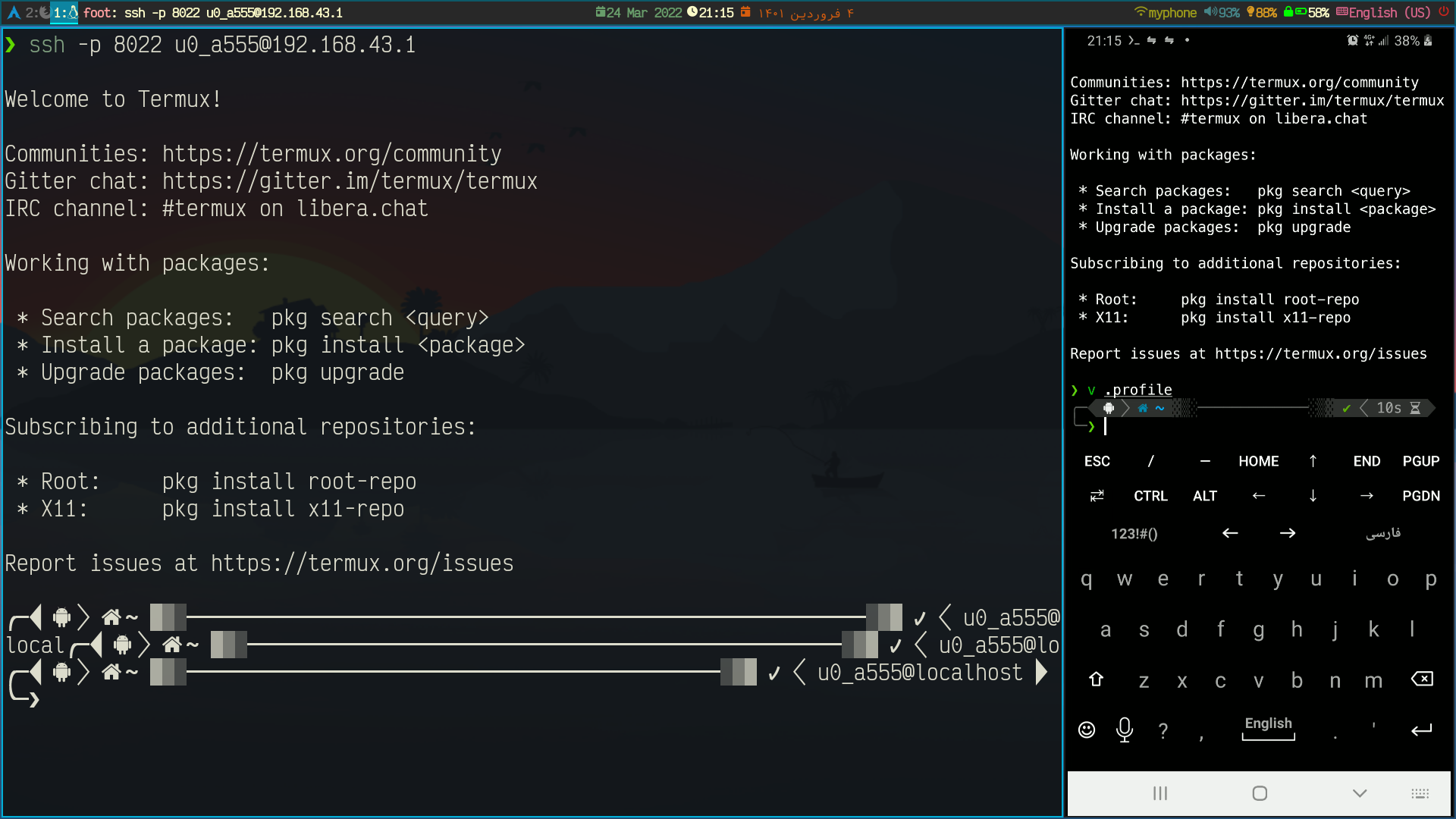
Missing terminfo Data on the Server
You may have encountered these errors many times when running a terminal-based program on a server you’ve SSH’d into:
Error opening terminal: xterm-kitty.
# OR
WARNING: terminal is not fully functional
/etc/hosts  (press RETURN)
These problems occur for the same reason I mentioned.
What to Do?
- On the server, change the
$TERMenvironment variable withexport TERM=xtermand test whether the problem is resolved. - Install the terminal emulator you’re using on the server as well. (For me this was not possible since I wanted to SSH from Termux.)
- Add the
terminfodata to the server.
Adding terminfo Data to the Server
- If you have the
terminfodata in a file, you can transfer it to the server and install it usingtic.
rsync <PATH-TO-YOUR.TERMINFO> <REMOTE-MACHINE>:/tmp
ssh <REMOTE-MACHINE>
sudo tic /tmp/emu.terminfo
If you don’t have the data, you can view it and save it to a file using infocmp > foot.terminfo. For foot, the data looks like this:
infocmp
#	Reconstructed via infocmp from file: /usr/share/terminfo/f/foot
foot|foot terminal emulator,
	am, bce, bw, ccc, hs, mir, msgr, npc, xenl,
	colors#0x100, cols#80, it#8, lines#24, pairs#0x10000,
	acsc=``aaffggiijjkkllmmnnooppqqrrssttuuvvwwxxyyzz{{||}}~~,
	bel=^G, blink=\E[5m, bold=\E[1m, cbt=\E[Z, civis=\E[?25l,
	clear=\E[H\E[2J, cnorm=\E[?12l\E[?25h, cr=\r,
	csr=\E[%i%p1%d;%p2%dr, cub=\E[%p1%dD, cub1=^H,
	cud=\E[%p1%dB, cud1=\n, cuf=\E[%p1%dC, cuf1=\E[C,
	cup=\E[%i%p1%d;%p2%dH, cuu=\E[%p1%dA, cuu1=\E[A,
	cvvis=\E[?12;25h, dch=\E[%p1%dP, dch1=\E[P, dim=\E[2m,
	dl=\E[%p1%dM, dl1=\E[M, ech=\E[%p1%dX, ed=\E[J, el=\E[K,
	el1=\E[1K, flash=\E]555\E\\, home=\E[H, hpa=\E[%i%p1%dG,
	ht=^I, hts=\EH, ich=\E[%p1%d@, ich1=\E[@, il=\E[%p1%dL,
	il1=\E[L, ind=\n, indn=\E[%p1%dS,
	initc=\E]4;%p1%d;rgb:%p2%{255}%*%{1000}%/%2.2X/%p3%{255}%*%{1000}%/%2.2X/%p4%{255}%*%{1000}%/%2.2X\E\\,
	invis=\E[8m, is2=\E[!p\E[?3;4l\E[4l\E>, kDC=\E[3;2~,
	kEND=\E[1;2F, kHOM=\E[1;2H, kIC=\E[2;2~, kLFT=\E[1;2D,
	kNXT=\E[6;2~, kPRV=\E[5;2~, kRIT=\E[1;2C, kbs=^?,
	kcbt=\E[Z, kcub1=\EOD, kcud1=\EOB, kcuf1=\EOC, kcuu1=\EOA,
	kdch1=\E[3~, kend=\EOF, kf1=\EOP, kf10=\E[21~, kf11=\E[23~,
	kf12=\E[24~, kf13=\E[1;2P, kf14=\E[1;2Q, kf15=\E[1;2R,
	kf16=\E[1;2S, kf17=\E[15;2~, kf18=\E[17;2~,
	kf19=\E[18;2~, kf2=\EOQ, kf20=\E[19;2~, kf21=\E[20;2~,
	kf22=\E[21;2~, kf23=\E[23;2~, kf24=\E[24;2~,
	kf25=\E[1;5P, kf26=\E[1;5Q, kf27=\E[1;5R, kf28=\E[1;5S,
	kf29=\E[15;5~, kf3=\EOR, kf30=\E[17;5~, kf31=\E[18;5~,
	kf32=\E[19;5~, kf33=\E[20;5~, kf34=\E[21;5~,
	kf35=\E[23;5~, kf36=\E[24;5~, kf37=\E[1;6P, kf38=\E[1;6Q,
	kf39=\E[1;6R, kf4=\EOS, kf40=\E[1;6S, kf41=\E[15;6~,
	kf42=\E[17;6~, kf43=\E[18;6~, kf44=\E[19;6~,
	kf45=\E[20;6~, kf46=\E[21;6~, kf47=\E[23;6~,
	kf48=\E[24;6~, kf49=\E[1;3P, kf5=\E[15~, kf50=\E[1;3Q,
	kf51=\E[1;3R, kf52=\E[1;3S, kf53=\E[15;3~, kf54=\E[17;3~,
	kf55=\E[18;3~, kf56=\E[19;3~, kf57=\E[20;3~,
	kf58=\E[21;3~, kf59=\E[23;3~, kf6=\E[17~, kf60=\E[24;3~,
	kf61=\E[1;4P, kf62=\E[1;4Q, kf63=\E[1;4R, kf7=\E[18~,
	kf8=\E[19~, kf9=\E[20~, khome=\EOH, kich1=\E[2~,
	kind=\E[1;2B, kmous=\E[<, knp=\E[6~, kpp=\E[5~,
	kri=\E[1;2A, oc=\E]104\E\\, op=\E[39;49m, rc=\E8,
	rep=%p1%c\E[%p2%{1}%-%db, rev=\E[7m, ri=\EM,
	rin=\E[%p1%dT, ritm=\E[23m, rmacs=\E(B, rmam=\E[?7l,
	rmcup=\E[?1049l\E[23;0;0t, rmir=\E[4l, rmkx=\E[?1l\E>,
	rmso=\E[27m, rmul=\E[24m, rs1=\Ec,
	rs2=\E[!p\E[?3;4l\E[4l\E>, sc=\E7,
	setab=\E[%?%p1%{8}%<%t4%p1%d%e%p1%{16}%<%t10%p1%{8}%-%d%e48:5:%p1%d%;m,
	setaf=\E[%?%p1%{8}%<%t3%p1%d%e%p1%{16}%<%t9%p1%{8}%-%d%e38:5:%p1%d%;m,
	sgr=%?%p9%t\E(0%e\E(B%;\E[0%?%p6%t;1%;%?%p5%t;2%;%?%p2%t;4%;%?%p1%p3%|%t;7%;%?%p4%t;5%;%?%p7%t;8%;m,
	sgr0=\E(B\E[m, sitm=\E[3m, smacs=\E(0, smam=\E[?7h,
	smcup=\E[?1049h\E[22;0;0t, smir=\E[4h, smkx=\E[?1h\E=,
	smso=\E[7m, smul=\E[4m, tbc=\E[3g, u6=\E[%i%d;%dR,
	u7=\E[6n, u8=\E[?%[;0123456789]c, u9=\E[c,
vpa=\E[%i%p1%dd,- The simpler way is to generate the data and pipe it directly to the server for installation:
infocmp | ssh <REMOTE-MACHINE> "tic -x /dev/stdin"- But if your server is old or for some reason
ticcannot access/dev/stdin, you can write the data directly to a file on the server and then install it:
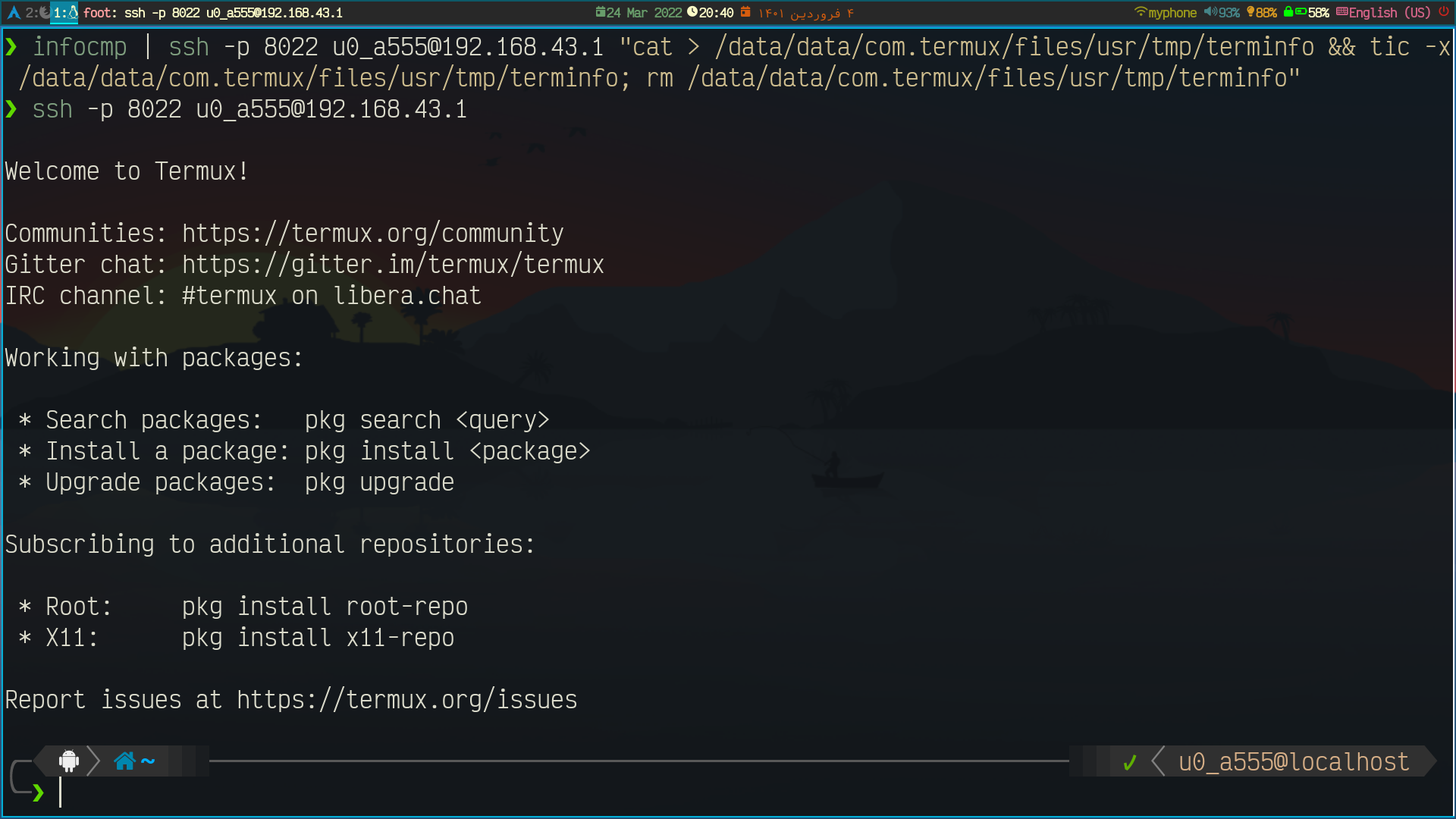
infocmp | ssh <REMOTE-MACHINE> "cat > /tmp/terminfo && tic -x /tmp/terminfo; rm /tmp/terminfo"After adding foot data to termux, my problem was resolved.
Resources:
Comments
You can view the comments for this post on Mastodon here . Click the link below to write a comment.