Mahour Extension Update
In this post, using the update of the Mahour extension as an occasion, I’ll try to write a bit about Firefox extensions and how to build one.
Firefox Extensions
Before November 2017, various tools existed for building a Firefox extension, but in newer versions some of them — such as overlay add-ons, bootstrapped add-ons, Add-on SDK, and others — are no longer supported. New extensions must be built using WebExtensions APIs. If you have a Legacy extension and want to make it compatible with newer versions of Firefox, you can use this Mozilla guide.
Structure of WebExtensions
Every WebExtension has a manifest.json file that defines its structure, resources, and properties. The image below shows the general structure of the manifest.json file in a WebExtension.
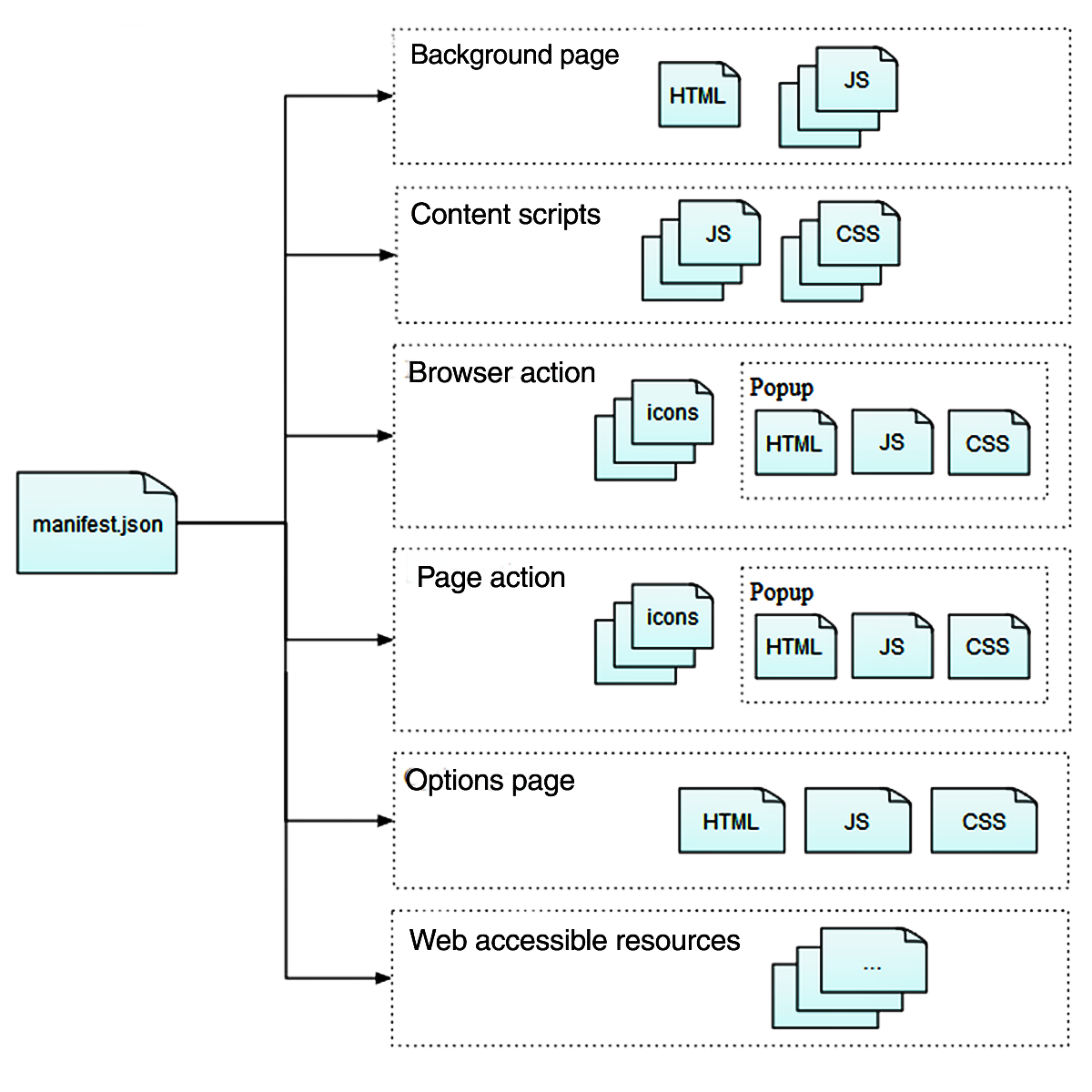
Sample manifest.json file for the Mahour extension:
{
  "manifest_version": 2,
  "name": "Mahour",
  "description": "Adds a new Iranian(Persian/Jalali/Khorshidi) date column to ThunderBird.",
  "version": "1.1.2",
  "homepage_url": "https://github.com/mhdzli/mahour",
  "author": "M.Zeinali",
  "applications": {
    "gecko": {
      "id": "mahour@zmim.ir",
      "strict_min_version": "68.0a1"
    }
  },
  "[experiment_apis](experiment_apis)": {
    "MahourDate": {
      "schema": "api/schema.json",
      "parent": {
        "scopes": ["addon_parent"],
        "paths": [["MahourDate"]],
        "script": "api/experiments.js"
      }
    }
  },
  "background": {
    "scripts": ["background/background.js"]
  },
  "browser_action": {
    "default_title": "ماهور",
    "default_popup": "popup/popup.html",
    "default_icon": {
      "48": "assets/icons/icon48.png"
    }
  },
  "options_ui": {
    "page": "options/options.html",
    "open_in_tab": false
  },
  "icons": {
    "32": "assets/icons/icon32.png",
    "48": "assets/icons/icon48.png",
    "64": "assets/icons/icon64.png",
    "128": "assets/icons/icon128.png"
  },
  "permissions": ["storage"]
}
This file contains the following keys:
- Essential keys that must be defined:
- Manifest version (
manifest_version) - Extension name (
name) - Extension version (
version)
- Manifest version (
- Optional keys:
- Application description (
description) - Icons (
icons) - Extension website or repository (
homepage_url) - Author (
author)
- Application description (
- Browser-specific settings (
browser_specific_settingsorapplicationshere). Browser properties required to run the extension when needed are specified in this key:- Minimum version of the browser’s content rendering engine (
gecko: content rendering engine) - Extension ID for the content engine (
gecko.id)
- Minimum version of the browser’s content rendering engine (
- Background scripts (
Background scripts): these scripts run in the background in a special page called thebackground page. - Content scripts (
Content scripts) that do the main work and generate content for different parts of the extension. Mahour usesexperiment_apisinstead of this key. The content script is loaded inside the API. - Experimental API (
experiment_apis): with this key, a new API can be created for use in the extension. - Default pages that can use
cssandjsfiles like a regular webpage:- Sidebars (
Sidebars) - Popups — their properties are defined in the
browser_action || page_actionkey. - Options: their properties are defined in the
options_uikey. This key makes thePreferencesoption visible for the extension in theAdd-ons Managerpage. Clicking on it loads the options page in that section and allows changing extension properties. (Setting theopen_in_tabproperty will open a new page for loading.)
- Sidebars (
- Extension pages (
Extension pages): each extension can also contain its own custom pages in addition to the default pages, which are defined here. - Web accessible resources (
Web accessible resources): if we want to useHTML,CSS,JavaScript, etc. files in the extension’s content generation, we specify them here. (Example: if the extension needs to display images on web pages, we path them here so we can access them.) - Permissions (
permissions): the permissions required by the application are specified with this key. For optional permissions that won’t block execution if absent, theoptional_permissionskey is used.
Extension APIs
To better understand Mozilla’s APIs and how to use them, read this guide.
Below is an example of an API defined in manifest.json:
{
  "manifest_version": 2,
  "name": "Extension containing an experimental API",
  "experiment_apis": {
    "apiname": {
      "schema": "schema.json",
      "parent": {
        "scopes": ["addon_parent"],
        "paths": [["myapi"]],
        "script": "implementation.js"
      },

      "child": {
        "scopes": ["addon_child"],
        "paths": [["myapi"]],
        "script": "child-implementation.js"
      }
    }

}
}
In each API, one or more namespaces are defined, whose objects can be called in extension scripts. A schema must be defined for each API that specifies the API’s properties. The schema key in manifest.json specifies a relative path within the extension’s root for the schema file.
The main properties of the parent process and child processes are specified with the parent and child keys and their script paths.
Currently, the only allowed options for the scopes key for specifying the access scope of each namespace are addon-child and addon-parent.
The schema file for the Mahour extension:
[
  {
    "namespace": "MahourDate",
    "functions": [
      {
        "name": "addWindowListener",
        "type": "function",
        "description": "Adds a listener 3pane windows",
        "async": false,
        "parameters": [
          {
            "name": "hich",
            "type": "string",
            "description": "hich"
          }
        ]
      },
      {
        "name": "changeSettings",
        "type": "function",
        "description": "Handle Prefrences",
        "async": true,
        "parameters": [
          {
            "name": "newSettings",
            "type": "object",
            "properties": {
              "longMonth": { "type": "boolean" },
              "showTime": { "type": "boolean" },
              "weekDay": { "type": "boolean" },
              "englishNumbers": { "type": "boolean" }
            }
          }
        ]
      }
    ]
  }
]
In this file, two functions addWindowListener and changeSettings are defined for the MahourDate namespace. The first function adds a windowListener to control the display of the Date column at program startup. The second function rebuilds and displays the Date column when the settings are changed.
Note: Calling these functions in the
background scriptmust be accompanied by a variable. Therefore, even thoughaddWindowListenerdoesn’t need any input, a variable namedhich(meaning “nothing” 😂) is defined for it.
These functions are defined inside the api/experiments.js script, which is referenced in the parent property of the MahourDate API in the extension’s manifest.json file.
The experiment.js file:
// This Source Code Form is subject to the terms of the
// GNU General Public License, version 3.0.

"use strict";

var { Services } = ChromeUtils.import("resource://gre/modules/Services.jsm");
var { ExtensionSupport } = ChromeUtils.import(
"resource:///modules/ExtensionSupport.jsm"
);
var { ExtensionParent } = ChromeUtils.import(
"resource://gre/modules/ExtensionParent.jsm"
);

const EXTENSION_NAME = "mahour@zmim.ir";
var extension = ExtensionParent.GlobalManager.getExtension(EXTENSION_NAME);

//customizeable options
var monthStyle = "long";
var timeStyle = "2-digit";
var weekDayStyle = "hidden";
var numbersStyle = "arabext";

// Implements the functions defined in the experiments section of schema.json.
var MahourDate = class extends ExtensionCommon.ExtensionAPI {
onStartup() {}

onShutdown(isAppShutdown) {
if (isAppShutdown) return;
Services.obs.notifyObservers(null, "startupcache-invalidate");
}

getAPI(context) {
context.callOnClose(this);
return {
MahourDate: {
addWindowListener(hich) {
ExtensionSupport.registerWindowListener(EXTENSION_NAME, {
chromeURLs: [
"chrome://messenger/content/messenger.xul",
"chrome://messenger/content/messenger.xhtml",
],
onLoadWindow: paint,
onUnloadWindow: unpaint,
});
},
changeSettings(newSettings) {
if (newSettings.longMonth) {
monthStyle = "long";
} else {
monthStyle = "2-digit";
}
if (newSettings.showTime) {
timeStyle = "2-digit";
} else {
timeStyle = "hidden";
}
if (newSettings.weekDay) {
weekDayStyle = "long";
} else {
weekDayStyle = "hidden";
}
if (newSettings.englishNumbers) {
numbersStyle = "latn";
} else {
numbersStyle = "arabext";
}
for (let win of Services.wm.getEnumerator("mail:3pane")) {
win.MahourDate.MahourDateHeaderView.destroy();
win.MahourDate.MahourDateHeaderView.init(win);
}
},
},
};
}

close() {
ExtensionSupport.unregisterWindowListener(EXTENSION_NAME);
for (let win of Services.wm.getEnumerator("mail:3pane")) {
unpaint(win);
}
}
};

function paint(win) {
win.MahourDate = {};
Services.scriptloader.loadSubScript(
extension.getURL("content/customcol.js"),
win.MahourDate
);
win.MahourDate.MahourDateHeaderView.init(win);
}

function unpaint(win) {
win.MahourDate.MahourDateHeaderView.destroy();
delete win.MahourDate;
}
To be able to call the addWindowListener and changeSettings functions, they are defined using the pattern specified in the Mozilla guide inside getAPI(context).
The addWindowListener function calls paint and unpaint functions via the onLoadWindow and onUnloadWindow events respectively. The paint function calls the content/customcol.js script to generate the column content and display it. The unpaint function stops the column display and clears its content.
The default values for the configurable variables are defined here. When they are changed in the extension’s options page, the changeSetting function is called via background.js, which rebuilds and displays the date column.
The content/customcol.js file:
// This Source Code Form is subject to the terms of the
// GNU General Public License, version 3.0.
var { AppConstants } = ChromeUtils.import(
  "resource://gre/modules/AppConstants.jsm"
);
var { Services } = ChromeUtils.import("resource://gre/modules/Services.jsm");

const jalaliDateColumnHandler = {
init(win) {
this.win = win;
},
getCellText(row, col) {
var date = new Date(this.getJalaliDate(this.win.gDBView.getMsgHdrAt(row)));
var currentDate = new Date();

    //fixed options
    var yearStyle = "2-digit";
    var dayStyle = "2-digit";

    var locale = "fa-IR-u-nu-" + numbersStyle + "-ca-persian";

    var year = date.toLocaleString(locale, { year: yearStyle });
    var month = date.toLocaleString(locale, { month: monthStyle });
    var day = date.toLocaleString(locale, { day: dayStyle });
    var weekDay =
      weekDayStyle != "hidden"
        ? date.toLocaleString(locale, { weekday: weekDayStyle })
        : "";
    var time =
      timeStyle != "hidden"
        ? date.toLocaleString(locale, {
            hour: timeStyle,
            minute: timeStyle,
            hour12: false,
          }) + " ،"
        : "";

    //fix for bug that doesn't prepend zero to farsei
    if (time.length != 7 && timeStyle != "hidden") {
      var zero = numbersStyle === "arabext" ? "۰" : "0";
      time = zero + time;
    }
    var isCurrentYear;
    if (currentDate.toLocaleString(locale, { year: yearStyle }) == year) {
      isCurrentYear = true;
    } else {
      isCurrentYear = false;
    }
    var isCurrentDay;
    if (date.toDateString() === currentDate.toDateString()) {
      isCurrentDay = true;
    } else {
      isCurrentDay = false;
    }
    var isYesterday;
    var yesterdayDate = new Date();
    yesterdayDate.setDate(currentDate.getDate() - 1);
    if (date.toDateString() === yesterdayDate.toDateString()) {
      isYesterday = true;
    } else {
      isYesterday = false;
    }

    var placehodler;
    if (monthStyle === "long") {
      placeholder = "TT \u202BWD DD MM YY\u202C";
    } else {
      placeholder = "TT YY/MM/DD WD";
    }

    //remove year if it's current year
    if (isCurrentYear) {
      placeholder = placeholder.replace(/YY./, "");
    }
    //only show time if it's current day or yesterday
    if (isCurrentDay) {
      placeholder = "TT Today";
    } else if (isYesterday) {
      placeholder = "TT Yesterday";
    }

    dateString = placeholder
      .replace("YY", year)
      .replace("MM", month)
      .replace("DD", day)
      .replace("WD", weekDay)
      .replace("TT", time);

    return dateString;

},
getSortStringForRow(hdr) {
return this.getJalaliDate(hdr);
},
isString() {
return true;
},
getCellProperties(row, col, props) {},
getRowProperties(row, props) {},
getImageSrc(row, col) {
return null;
},
getSortLongForRow(hdr) {
return 0;
},
getJalaliDate(aHeader) {
return aHeader.date / 1000;
},
};

const columnOverlay = {
init(win) {
this.win = win;
this.addColumns(win);
},

destroy() {
this.destroyColumns();
},

observe(aMsgFolder, aTopic, aData) {
try {
jalaliDateColumnHandler.init(this.win);
this.win.gDBView.addColumnHandler(
"jalaliDateColumn",
jalaliDateColumnHandler
);
} catch (ex) {
console.error(ex);
throw new Error("Cannot add column handler");
}
},

addColumn(win, columnId, columnLabel) {
if (win.document.getElementById(columnId)) return;

    const treeCol = win.document.createXULElement("treecol");
    treeCol.setAttribute("id", columnId);
    treeCol.setAttribute("persist", "hidden ordinal sortDirection width");
    treeCol.setAttribute("flex", "2");
    treeCol.setAttribute("closemenu", "none");
    treeCol.setAttribute("label", columnLabel);
    treeCol.setAttribute("tooltiptext", "Solar Date");

    const threadCols = win.document.getElementById("threadCols");
    threadCols.appendChild(treeCol);

    // Restore persisted attributes.
    let attributes = Services.xulStore.getAttributeEnumerator(
      this.win.document.URL,
      columnId
    );
    for (let attribute of attributes) {
      let value = Services.xulStore.getValue(
        this.win.document.URL,
        columnId,
        attribute
      );
      if (
        attribute != "ordinal" ||
        parseInt(AppConstants.MOZ_APP_VERSION, 10) < 74
      ) {
        treeCol.setAttribute(attribute, value);
      } else {
        treeCol.ordinal = value;
      }
    }

    Services.obs.addObserver(this, "MsgCreateDBView", false);

},

addColumns(win) {
this.addColumn(win, "jalaliDateColumn", "Date");
},

destroyColumn(columnId) {
const treeCol = this.win.document.getElementById(columnId);
if (!treeCol) return;
treeCol.remove();
},

destroyColumns() {
this.destroyColumn("jalaliDateColumn");
Services.obs.removeObserver(this, "MsgCreateDBView");
},
};

var MahourDateHeaderView = {
init(win) {
this.win = win;
columnOverlay.init(win);

    if (
      win.gDBView &&
      win.document.documentElement.getAttribute("windowtype") == "mail:3pane"
    ) {
      Services.obs.notifyObservers(null, "MsgCreateDBView");
    }

},

destroy() {
columnOverlay.destroy();
},
};
The main content of the column is built here and the new column is created.
Background Script
Background scripts, as special pages, have the window property with the Document Object Model property.
Background page properties:
The background page can access WebExtension APIs when the extension has the necessary permissions. It can also send XHR requests based on host permissions (host permissions). For more information, search for Cross-origin access.
The background script does not have direct access to web pages, but it can load content scripts (content scripts) in them and communicate with them using the message-passing API. This approach is used in the Mahour extension.
Note: Background scripts also have limitations to prevent access to unauthorized actions. The inability to call
eval()is an example of these limitations. For more information, readContent Security Policy. Also, callingalert(),confirm(), orprompt()is not possible in this page.
Mahour’s background script code:
"use strict";

/*
Default settings. Initialize storage to these values.
*/
var datePrefrences = {
longMonth: true,
showTime: true,
weekDay: false,
englishNumbers: false,
};

/*
Generic error logger.
*/
function onError(e) {
console.error(e);
}

/*
On startup, check whether we have stored settings.
If we don't, then store the default settings.
*/
function checkStoredSettings(storedSettings) {
if (!storedSettings.datePrefrences) {
browser.storage.local.set({ datePrefrences });
}
}

function repaint(newSettings) {
browser.MahourDate.changeSettings(newSettings);
}

const gettingStoredSettings = browser.storage.local.get();
gettingStoredSettings.then(checkStoredSettings, onError);

/* globals browser */
var init = async () => {
browser.MahourDate.addWindowListener("hich");
};

init();
The storage permission is obtained in manifest.json to use browser.storage.local.get() and browser.storage.local.set(). MahourDate is the identifier for this extension’s new API. Using browser.MahourDate.changeSettings(newSettings), one of its functions is called to apply settings.
Update for Thunderbird Version 115 and Later
In Thunderbird version 110, support for Custom Column was discontinued and the Mahour extension stopped working. With the addition of a new API in version 115, it became possible to update the code and support these versions. If you’d like to know more, we discussed it here.
Since I didn’t have enough time to update the code, it took a while, but eventually Mahour supports newer versions up to 128.
Useful Resources:
If you’re not familiar with building extensions and are just starting out, watch this video by Shojaei:
To test extensions on Thunderbird, in the Add-ons Manager page click on Tools for all add-ons ( ). By selecting Debug Add-ons, a new tab opens where you can temporarily install and test extensions. Simply click on Load Temporary Add-on and select the extension’s manifest.json file.
Comments
You can view the comments for this post on Mastodon here . Click the link below to write a comment.